POP3 E-mail
You can use VZGlobal, BroadbandAccess or NationalAccess to access your POP3 e-mail account if your e-mail provider allows access through other providers (many do). If your provider restricts access to their outgoing mail server you will get an error message similar to the one below if you are attempting to send mail.
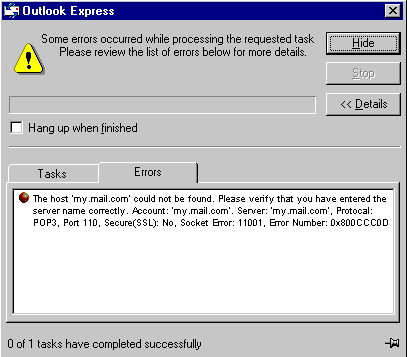
Most send mail servers are not accessible from various connections to the Internet. You usually have to be connected to the e-mail provider's network to access their mail server and most e-mail providers require authentication (a user name and password). The reason everyone has had to resort to this is that without these measures, anyone can use a send mail server to send massive amounts of unwanted junk e-mail. If you are having trouble sending e-mail - this also includes replying and forwarding, and you are getting an error message similar to that shown above, then your send mail server can not be accessed from the Verizon Wireless network.
For customers in this situation, Verizon Wireless has made available a send mail server that you can use in place of the one you normally use. All that is required is that you have a TXT messaging capable Verizon Wireless device and TXT messaging service, visit www.vtext.com and establish a profile there by selecting "Join Up" and completing the form. You will be asked to enter your 10 digit mobile number. A TXT message will be sent to your wireless device and will be used to establish your password. Most Verizon Wireless devices can receive TXT messages. Most Verizon Wireless phones are TXT messaging capable. If you have a PC card that is not capable of receiving TXT messages and you have a Verizon Wireless phone that is, you can use it to establish a profile on www.vtext.com as described above.
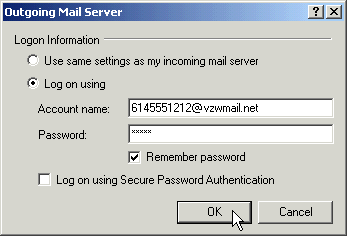
To use the Verizon Wireless Send Mail Server, you will edit your existing Mail account settings and change the outgoing mail server you are currently using. In place of your existing Send Mail Server, enter smtp.vzwmail.net, select "My server requires authentication" and using the 10 digit mobile number you used to establish your profile on www.vtext.com, enter the 10 digit mobile number@vzwmail.net (i.e. 6145551212@vzwmail.net) for the Send Mail Server user name. For the password, use the password you established for www.vtext.com. You will also be able to use this server when connected to the Internet from various providers eliminating the need to change this setting when you switch from being connected to the Internet through Verizon Wireless and by various other means. If you need to know where these settings normally are in your e-mail client, check with your e-mail provider. For your convenience the settings for Outlook Express® are as follows:
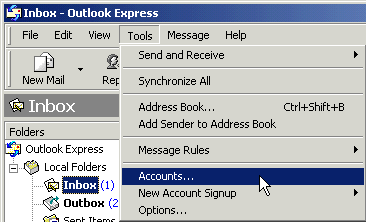
Step 1: Select "Tools," "Accounts."
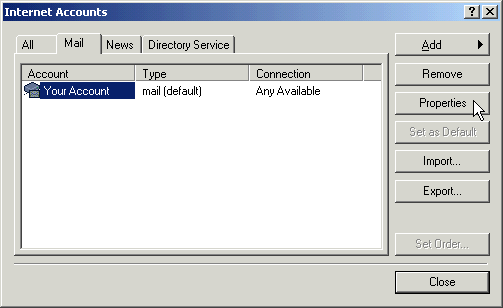
Step 2: Select your default account, then "Properties."
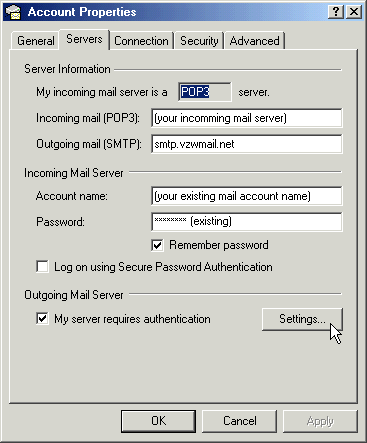
Step 3: Select the "Servers" tab. In the "Outgoing mail (SMTP):" field enter "smtp.vzwmail.net" without quotes. In the "Outgoing Mail Server" section at the bottom, select "My server requires authentication," then select "Settings."
Step 4: Select "Log on using," then using the 10-digit mobile number you used to establish your profile at www.vtext.com, enter the 10-digit mobile number@vzwmail.net for the account name (i.e. 6145551212@vzwmail.net). For the password, enter the password you established on www.vtext.com. Select "Remember password." Select "OK," "Apply," "OK," "Close" to get back to the Outlook Express® main screen. It may take up to two hours for your www.vtext.com credentials to be valid on the smtp.vzwmail.net server. Once they are valid, you should be able to send mail using the Verizon Wireless Send Mail Server (also referred to as a SMTP - Simple Mail Transport Protocol Server), when you are connected to the Internet, wirelessly or via other means.
Additional important notes about the Verizon Wireless Send Mail Server
| • | There is no monthly charge for this service. |
| • | Message Limits are as follows: 2MB Message Size, 100 Recipients per message. |
| • | Customers that are identified as using this server to generate SPAM messages (what most would consider unsolicited junk e-mail) will be denied access to this server (e-mail messages will not be sent). |
| • | If you are using an e-mail client other than Outlook® or Outlook Express® and it fails to work with the Verizon Wireless Send Mail server, it may not support authentication correctly. Try using Outlook Express® if you have any problems. If it works and your e-mail client does not, check to see if any updates are available for your e-mail client. |
| • | NOTE: Credentials established on www.vtext.com may take up two hours before they will work on the smtp.vzwmail.net server. If your credentials work on www.vtext.com but not on the smtp.vzwmail.net server, try again after two hours. |
Web Based E-mail
If you currently do not have e-mail software, or if you do not have Verizon Wireless device capable of text messaging, you can sign up for web based e-mail at any of the popular portal sites, such as http://www.yahoo.com, or http://www.msn.com. You may also search for other e-mail providers from any of these pages.