The VZAccess Manager interface can be minimized to take up as little screen real estate as possible. To minimize the interface, select "Minimum" from the "View" menu.
Clicking on the "Connect" button in Minimum view will establish a connection with NationalAccess-BroadbandAccess. To connect to a Wi-Fi network, please exit the Minimum view.
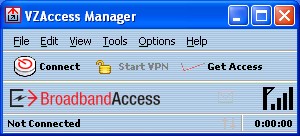
To exit the Minimum view, you have the following options:
| • | In the top, right-hand corner, click the "Maximize" button (to the left of the Exit button) |
| • | In the View menu, de-select “Minimum” |
| • | Select any other option on the View menu. |