Back to Contents Page

Opening the Computer Cover

Dell™ OptiPlex™ GX270 Service Manual

CAUTION: Before you begin any of the procedures in this section, follow the steps in "Safety Instructions."
  1. Shut down the computer through the Start menu.

  2. Ensure that your computer and attached devices are turned off. If your computer and attached devices did not automatically turn off when you shut down your computer, turn them off now.

NOTICE: To disconnect a network cable, first unplug the cable from your computer and then unplug it from the network wall jack.
  1. Disconnect any telephone or telecommunication lines from the computer.

  2. Disconnect your computer and all attached devices from their electrical outlets, and then press the power button to ground the system board.

  3. Remove the computer stand, if it is attached.

CAUTION: To guard against electrical shock, always unplug your computer from the electrical outlet before opening the cover.
NOTICE: Ensure that there is sufficient space to support the open cover—at least 30 cm (1 ft) of desk top space.

Small Form-Factor and Small Desktop Computers

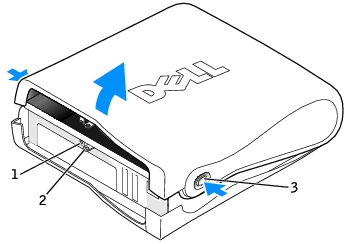
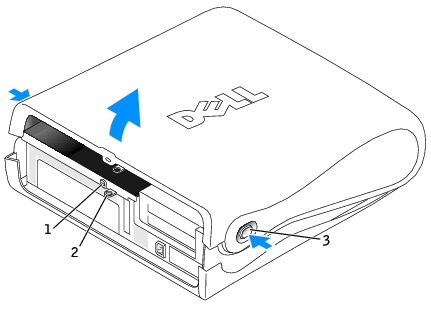
  1. Locate the two release buttons shown in the illustration. Then press the two release buttons as you lift the cover.

NOTICE: Open the cover slowly to ensure that you do not damage any cables.
  1. Raise the back of the cover, and pivot it toward the front of the computer.

Small Form-Factor Computer

1

security cable slot

2

padlock ring

3

release buttons (one on each side)

Small Desktop Computer

1

security cable slot

2

padlock ring

3

release buttons (one on each side)

Small Mini-Tower Computer

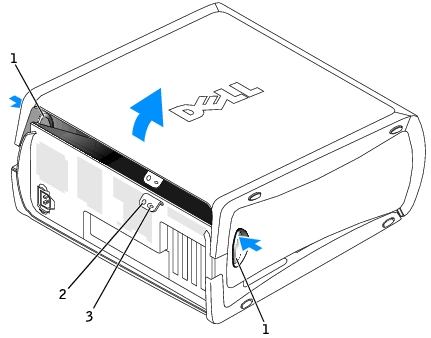
  1. Lay the computer on its side as shown in the illustration.

  2. Open the cover:

    1. Facing the back of the computer, press the release button on the right side of the computer with one hand while pulling up on the top of the cover with the other hand.

    1. Press the release button on the left side of the computer with one hand while pulling up on the top of the cover with the other hand.

    2. Hold the bottom of the computer with one hand, and then pull open the cover with the other hand.

1

release buttons (2)

2

security cable slot

3

padlock ring


Back to Contents Page