Proxy settings effect the way your computer and browser connect to other computers on the Internet and local networks. It is highly recommended that you consult your network support staff before changing these settings described here.
Most corporations go through a proxy server to access the Internet via the corporate network. If you wish to access the Internet directly through VZGlobal, BroadbandAccess or NationalAccess, proxy settings must be turned off. If you are connecting to your corporation's network using VPN (Virtual Private Networking) and your corporation uses proxies, then you would need the correct proxy settings to be able to access the Internet. For exact details on the proxy settings needed when accessing your corporate network, contact your corporate network technical support department if you need additional assistance.
When accessing the Internet directly,performance is improved because you eliminate VPN client overhead. Also, for BroadbandAccess and NationalAccess, if the Venturi compression software is installed, it will also increase performance when you are accessing the Internet directly. When using a VPN client, it creates a secure connection to your corporate network and prevents accessing the Venturi compression servers on the Verizon Wireless network, so Venturi is of no value when you are using VPN.
Proxy settings if using Internet Explorer (version 5 and newer)
If you are using proxy settings, when connected to a corporate network via your Network adapter, they will be entered under LAN settings. These settings apply to devices that appear to Windows as Network adapters - this includes Wi-Fi adapters as well as your Network adapter. You can access the LAN Settings by doing the following:
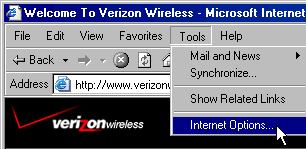
Step 1: In Internet Explorer, select "Tools," "Internet Options."
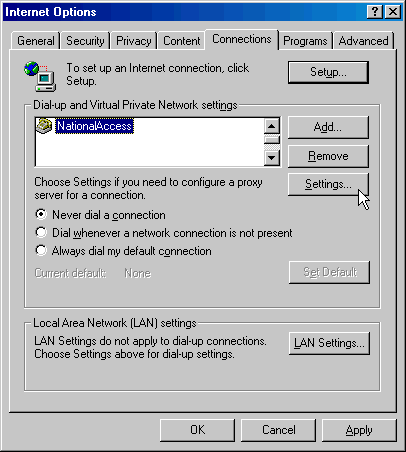
Step 2: Then select the "Connections Tab" and "LAN Settings."
If your company uses proxy settings they will appear here.
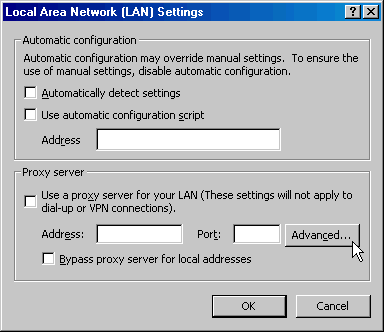
Step 3: If you are only using Wi-Fi connections without VPN and you want to access the Internet directly, you would uncheck the first three options to turn proxy settings off. If using VPN and if the settings are present you would leave them. To restore the settings you would navigate back to this screen and recheck any boxes you had unchecked. If using a WWAN device, you will find that VZGlobal, BroadbandAccess and NationalAccess have no proxy settings associated with them by default in VZAccess Manager. This means you can access the Internet directly using these connections but if you connect via VPN and your company requires proxy settings, you will not be able to access the Internet when connected via VPN. Performance is better if you drop your VPN connection when you want to access the Internet directly, but, if desired, you can record all the settings on the "Local Area network (LAN) Settings" screen and on the screen that appears when you select the "Advanced" button (Step 5), enter these settings in the properties for your WWAN connections (VZGlobal, BroadbandAccess, NationalAccess). Note: If desired, you can have proxy settings automatically turned off when you connect using Wi-Fi connections - See Wi-Fi Specific Settings.
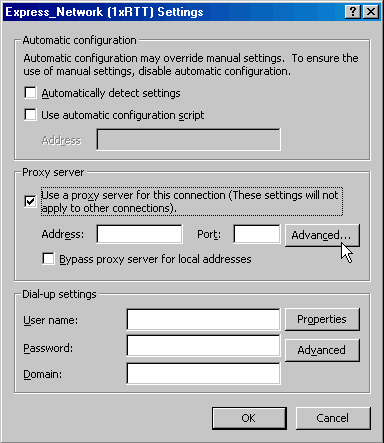
Step 4: If you need to enter proxy settings for the connections used by VZAccess Manager, you would use the "Connections" tab in the previous step, highlight the connection -- ex. NationalAccess -- and then select "Settings." (If you need to navigate to this tab, from Internet Explorer's main screen, select "Tools," "Options" as shown in Step 1 and then the "Connections" tab.)
Step 5: The settings will be displayed. You can now enter the same proxy settings you recorded in Step 3, if you desire to use VPN and your proxy settings with these connections. If necessary also enter the information recorded from the screen that appears after selecting the "Advanced" button. To disable proxy settings for these connections you would have to uncheck the "Use proxy server..." box. Proxy settings must be disabled to access the Internet directly when using these connections without VPN.
Proxy Settings if using Internet Explorer 4.x
In Internet Explorer 4.x, proxy settings are global and have to be turned off when accessing the Internet directly through BroadbandAccess or NationalAccess and back on if required by your company when using their network to access the Internet or when using VPN.
Step 1: Right-click on the Internet Explorer icon and go to properties (or if Internet Explorer is already open go to View then Internet Options...).
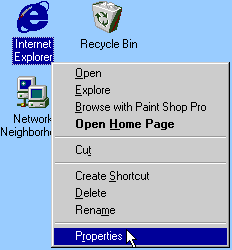
Step 2: Click on the "Connection" tab. Uncheck the box labeled "Access the Internet using a proxy server" then click "OK" or "Apply." You may now access the Internet through BroadbandAccess or NationalAccess.
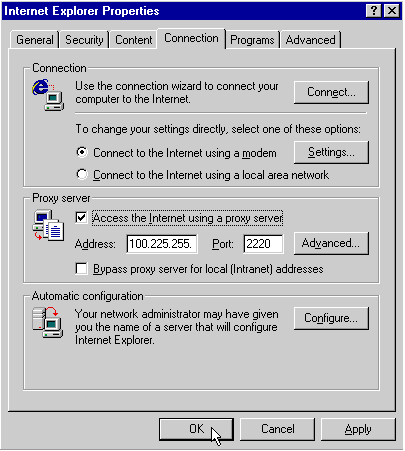
When you wish to access the Internet through your corporate network proxy server, you must repeat these steps, checking the box labeled "Access the Internet using a proxy server." If your proxy setting is incorrect for the connection you are using, you will get an error whenever you try to go to any site.
Proxy Settings if using Netscape Navigator 4.0 and higher
In Netscape Navigator 4.0 and higher, proxy settings are global and have to be turned off when accessing the Internet directly through VZGlobal, BroadbandAccess or NationalAccess and back on if required by your company when using their network to access the Internet or when using VPN.
Step 1: From within your browser, go to "Edit" then "Preferences."
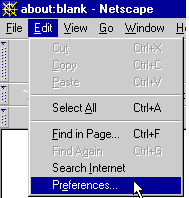
Step 2: Click on the "+" beside "Advanced" then "Proxies." Next select "Direct connection to the Internet" and click "OK." You may now access the Internet through VZGlobal, BroadbandAccess or NationalAccess.
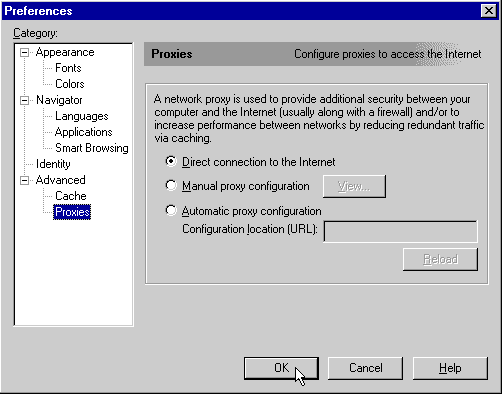
Reminder: When you wish to access the Internet through your corporate network proxy server, you must repeat these steps, selecting "Manual proxy configuration" then clicking "OK." If your proxy setting is incorrect for the connection you are using, you will get an error whenever you try to go to any site.