To access the TXT preferences, click on the "Tools" menu, then "Preferences...." and select the "TXT" tab.
VZAccess Manager supports TXT Messaging for certain wireless devices only.
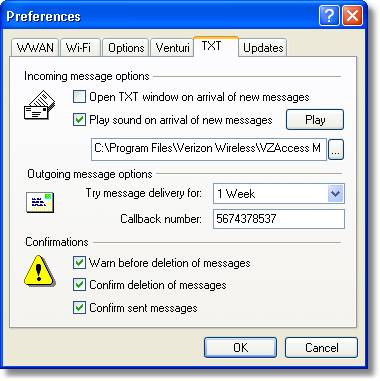
Incoming Message Options
| • | Open TXT window on arrival of new message: VZAccess Manager will automatically switch to the TXT view when a new message arrives |
| • | Play sound on arrival of new messages: A sound file (.WAV) can be selected to play when new messages arrive. |
Outgoing Message Options
| • | Message delivery duration: The duration of time that the Verizon Wireless network will attempt to deliver the message. The default is a duration of 1 week. |
Confirmations
The following confirmation dialogs can be turned on or off:
| • | Warn before deletion of messages |
| • | Confirm deletion of messages |
| • | Confirm sent messages |