When installing VZAccess Manager, it was not able to find the Wi-Fi device.
| • | Verify that the client that came with the Wi-Fi device can talk to it. If it can't, contact the Wi-Fi device manufacturer for assistance getting it to work with the client it comes with. Then try VZAccess Manager again. |
| • | Check with the Wi-Fi device manufacturer to see if newer drivers are available. If they are, download and install them. |
| • | If using a Wi-Fi PC card, try removing it and reinserting it. |
| • | On Windows 2000 and XP, this can happen if you do not have administrative rights. Check with your IT department, if you have one, to see if they limited your user rights. If they have, you will need their assistance to run the setup wizard with administrative rights. You can access the setup wizard from VZAccess Manager's main screen by selecting "Tools," "Run Wizard." |
When installing VZAccess Manager, a dialog appeared stating that a feature in the Cisco® Aironet® Client needed to be enabled.
| • | A simple configuration change is required to the Cisco® Aironet® Client to allow VZAccess Manager to work properly. Select, "Start," "Programs," "Cisco Systems," "Aironet Client Utility (ACU)," "Select Profile," then select "Use Another Application to Configure My Wireless Settings," and "Apply." |
When installing VZAccess Manager, a dialog appeared stating "You will need to upgrade your Wi-Fi card drivers before running this program..."
| • | Check with the Wi-Fi device manufacturer to see if newer drivers are available. If they are download and install them. |
I get connected, but I can't get to any web sites.
| • | If you are using VPN (Virtual Private Networking) you may require proxy settings to access the Internet when Wi-Fi connections. To see if this is the case disconnect from your VPN and see if you can access the Internet directly. Also if you are not using VPN and you have proxy settings set, they will prevent you from accessing web pages. For additional information see Turning Proxy Settings On and Off. |
| • | If you are using a notebook provided by your employer, it's possible they might be using Microsoft's Winsock Proxy or a similar program that enforces Proxy settings without having to enter any proxy settings in your web browser. If this is the case you would only be able to access the Internet when using VPN. To access the Internet directly you would have to disable the Winsock Proxy. Usually these applications have an icon in Control Panel that allows turning them on and off. Check with your Network Administrator if you think this might be the case. |
I'm unable to connect using Wi-Fi.
| • | A low signal can cause this. Try moving within the Wi-Fi hot spot to improve your signal and try connecting again. |
| • | This can happen when your computer fails to successfully obtain an IP address. Try performing a release and renew by selecting the following from VZAccess Manager's main screen: "Session," "Statistics," "Wi-Fi" tab. The "Address type" should show "Assigned by DHCP." If it shows "Automatic Private Address" you have not been assigned an IP address from the Wi-Fi network. Select "Release," then "Renew." |
| • | Try selecting "Disconnect" and then connect again. |
I can receive e-mail but cannot send e-mail using my e-mail program.
| • | Some Internet Service Providers require that you be connected through them to access their mail server to send e-mail. See section on E-mail Options. |
I connected OK, everything was working, then everything stopped working.
| • | A low signal can cause this. Try moving within the Wi-Fi hot spot to improve your signal and try connecting again. |
| • | If necessary, try disconnecting and reconnecting. |
My connection was lost.
| • | A low signal can cause this. Try moving within the Wi-Fi hot spot to improve your signal and try connecting again. |
I can't get VZAccess Manager to work with my private Wi-Fi Network.
| • | First verify that the client that came with the Wi-Fi device works with your private network. If it doesn't, contact your Wi-Fi device provider and or the device provider of your network equipment. |
| • | In the section on Wi-Fi specific settings there are options to manually add a Wi-Fi network if it does not broadcast its Network ID (SSID) which would prevent it from appearing in VZAccess Manager. There is also an option to enter / edit your WEP (Wireless Equivalent Privacy) password if your network requires one. If it was incorrectly entered, it could prevent you from connecting. |
| • | The issue may be related to using WEP security and your specific Wi-Fi adapter. You may want to temporarily test your network without WEP to determine if this is the case. If it works without WEP and fails using WEP, please e-mail Verizon Wireless Tech support with your computer and Wi-Fi device info by doing the following: From VZAccess Manager's main screen select "Session," "Statistics," "My Computer" then "E-mail Technical Support." Please also include in the body of the e-mail your computer brand, model and any Wi-Fi device information you have - built in device or PC card, brand and model. We will pass this information on to Smith Micro for consideration in a future version. Use the client that came with your device if you have this issue. Also please be aware that Verizon Wireless does not support problems associated with Wi-Fi networks. Customer Care will not be able to assist you. |
Wi-Fi Statistics Support Tool
| • | From VZAccess Manager's main screen select "Session," "Statistics," then the Wi-Fi tab. |
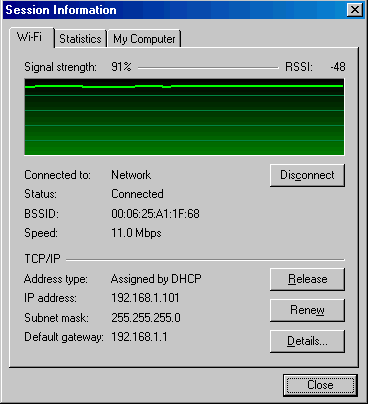
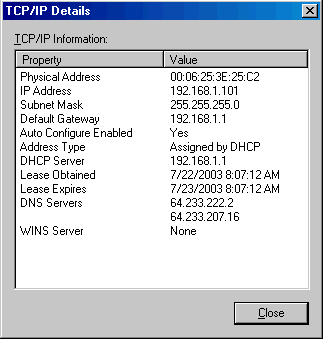
This tool displays signal strength, all relevant IP address information with additional details by selecting "Details." It also provides the ability to release your existing IP address and request a new one by selecting "Release," then "Renew." This procedure is a common troubleshooting step as explained in some of the symptoms and solutions listed above.
The "Details..." option will display the following information: